Pattern Recognition
Shopfloor Assistant includes an intelligent pattern-recognition system designed to detect and manage structured machining special MACROs such as regshapes (holes, slots, rectangles, hexagons, keyholes) and approach sequences.
When these patterns are identified, the system automatically groups their associated movements or command lines into a single logical block — making editing safer, faster, and far more consistent.
This feature is ideal for:
- recognizing repetitive machining structures
- quickly isolating and editing entire geometric features
- preventing accidental edits to only part of a regshape sequence
How to Use Pattern Recognition
Step 1: Select a regshape or approach line in the NC Editor
Shopfloor Assistant applies two intelligent selection rules when identifying structured machining patterns.
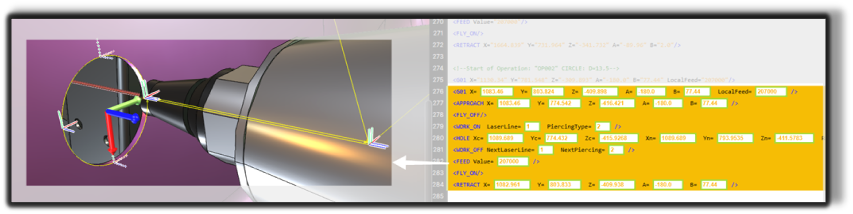
Rule 1 - Selecting a regshape line
When you click on a line belonging to a regshape (hole, slot, rectangle, hexagon, keyhole), the system automatically selects the entire regshape block, including:
- lead-in (if present)
- the approach point (if present)
- the main geometry (hole, slot, hexagon, rectangle, or keyhole)
- the retract point (if present)
Rule 2 - Selecting an approach line
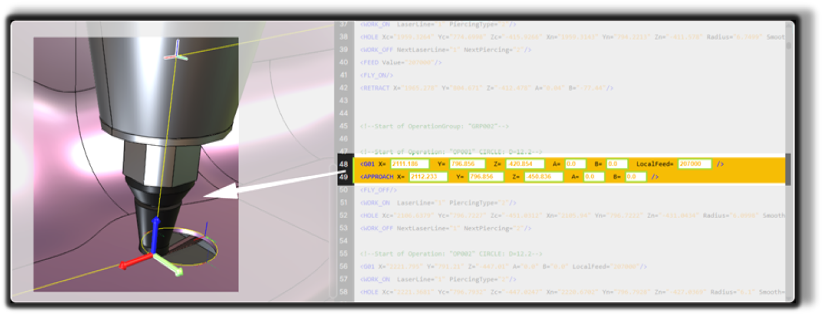
When selecting a line immediately preceding a regshape geometry, the system recognizes this as part of a structured feature and automatically selects:
- the lead-in point (safety distance before entry)
- the approach point
Step 2: Review the grouped selection
After a recognized line is selected, verify that the entire related feature is grouped.
This grouped behavior preserves the intended machining order:
- lead-in
- approach
- geometry
- retract
Step 3: What happens next
Once a block is selected:
- the full pattern is highlighted in both the NC Editor and the 3D Viewer
- you can safely apply transformations or regshape attribute changes
- visual confirmation ensures you are editing the complete feature, not just one line
Operator insights
- Pattern recognition ensures you always edit complete machining features, not just isolated lines, reducing errors and maintaining toolpath consistency.
- Using grouped selections helps preserve the intended machining order: lead-in -> approach -> geometry -> retract.
- Selecting a regshape or approach line guarantees that all related movements are highlighted both in the NC Editor and in the 3D Viewer.
- This feature is especially useful when performing rototranslations, regshape edits, or block-level modifications, ensuring all dependent lines are included.