Axis Teach Panel
The Axis Teach Panel is used to perform teach-based correction of selected points using offset values. It allows operators to adjust position and orientation relative to the current point and write back the resulting machine or robot axis values into the program, with a preview shown in the 3D Viewer before confirmation.
The Axis Teach Panel is located at the bottom of the NC Editor panel and is used when the Axis Teach workflow is active.

When the Axis Teach workflow is active, the Axis Teach Panel is shown, and the Manipulator is displayed on the first selected Pivot as a preview reference.
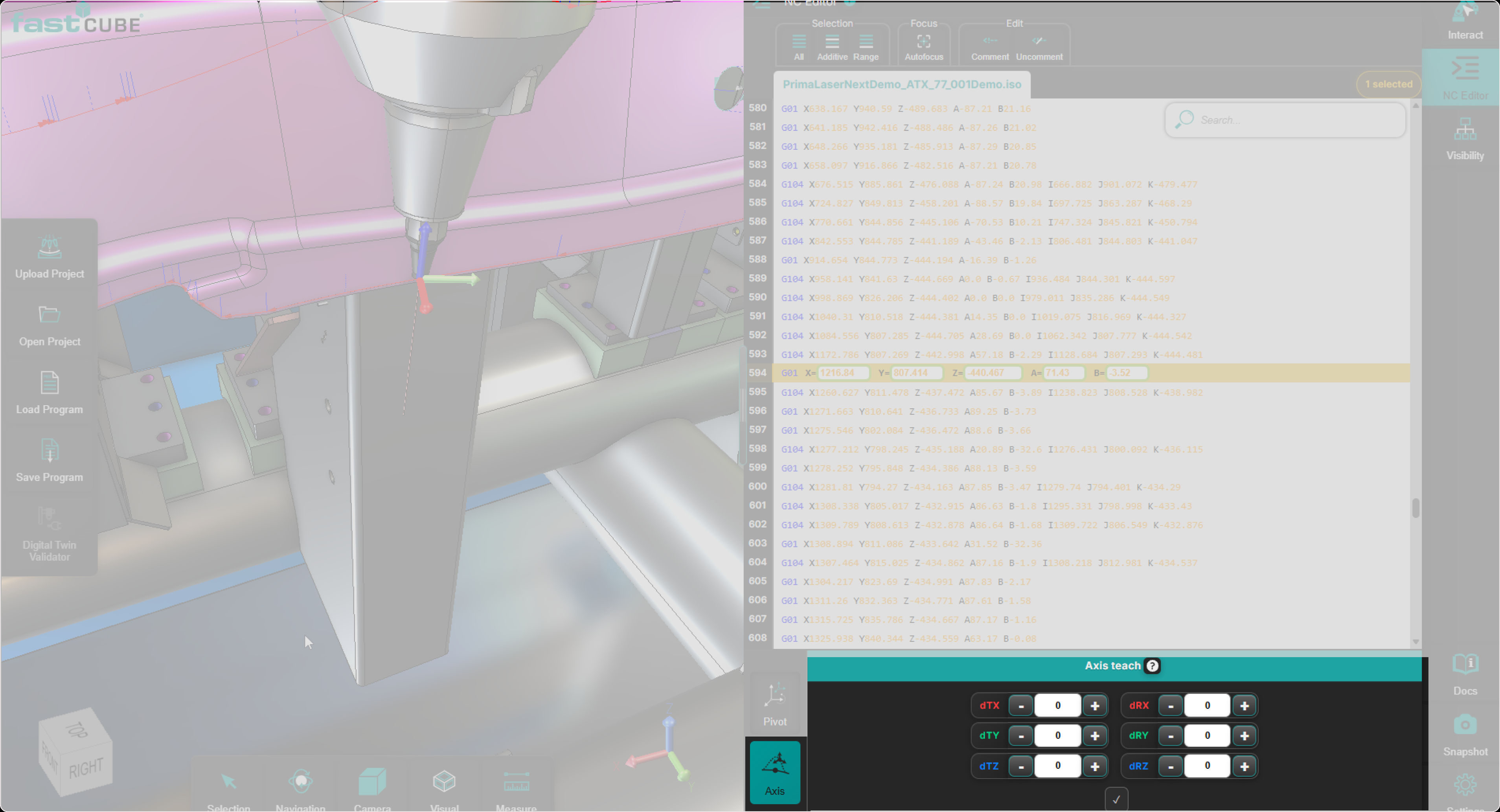
The panel is used to apply the following update types:
- Translation
- Rotation
- Translation and Rotation
Workflow persistence
Once the Axis Teach workflow is activated, it remains active when the user selects a different point.
This means:
- the user does not need to click the Axis Teach icon again.
- newly selected points are automatically handled by the active Axis Teach workflow.
This behavior allows efficient correction of multiple points in sequence using the same workflow and offset logic.
Purpose of the Axis Teach Panel
The purpose of this panel is to perform point-based teach correction: it adjusts selected points using offset values and writes back the resulting axis values after confirmation.
The workflow is designed for direct teaching of points, not for pivot-based orbiting.
It updates the selected points by applying translation and orientation changes and calculating the resulting axis values.
This allows operators to perform precise teach corrections without manually calculating or editing axis values.
Axis Teach behavior
Axis Teach is not a shared-pivot orbit workflow. Each selected point is processed using its own current position and local axis context.
The Manipulator reacts to the input and acts as a preview reference (shown on the first selected Pivot).
Offset values in the Axis Teach Panel
The values entered in the Axis Teach Panel are treated as offsets.
This means:
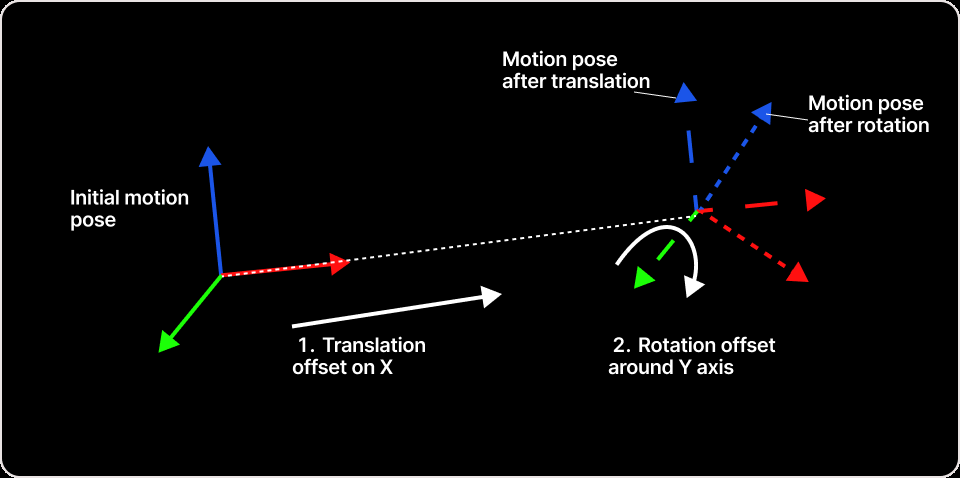
- the same translation and rotation offsets can be entered together.
- the system calculates the resulting axis values based on those offsets.
Applying teach corrections
The Axis Teach Panel supports the following correction modes.
- Translation - Translation applies position offsets to the selected point or points. A preview is available before confirmation.
How to apply a translation:
- Select one or more points from the NC Editor or 3D Viewer.
- Enter translation offsets in the Axis Teach Panel.
- Review the preview result (Manipulator shown on first selected Pivot).
- Press Accept to write back the resulting axis values.
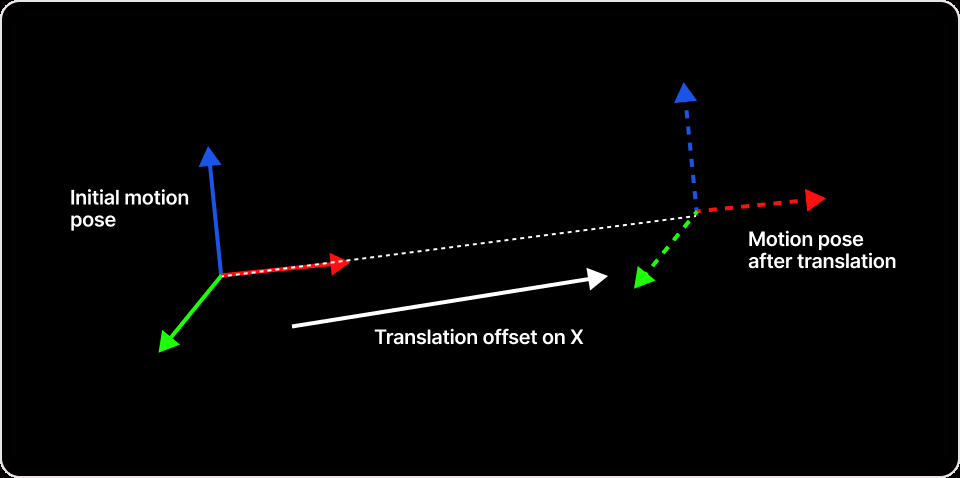
- Rotation - Rotation is not applied around a shared pivot. Instead, each selected point is updated using its own local axis context, and rotation changes are converted into updated axis values. The manipulator provides an orientation preview before confirmation.
How to apply a rotation:
- Select one or more points.
- Enter rotation offsets in the Axis Teach Panel.
- Review the orientation preview shown by the manipulator.
- Press Accept to write back the resulting axis values.
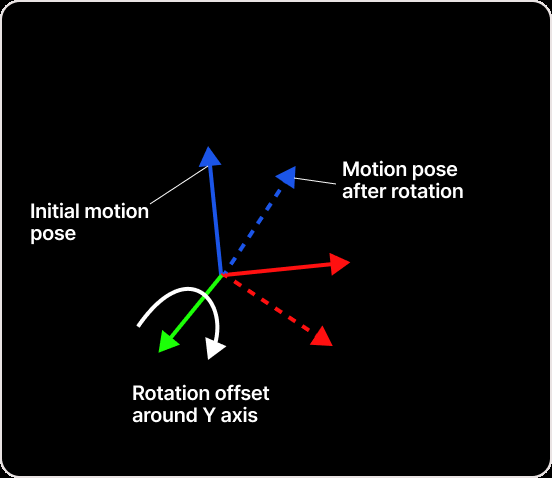
- Translation and Rotation - Translation and rotation can be entered together. The entered values are treated as offsets, and the final updated values are written back only after Accept.
How to apply translation and rotation:
- Select one or more points.
- Enter translation offsets and rotation offsets in the panel.
- Review the preview and orientation reference (Manipulator on first selected Pivot).
- Press Accept to write back updated axis values.
Multi-selection behavior
Axis Teach supports single-point and multi-point selection.
When multiple points are selected:
- the same offsets are applied to all selected points.
- each point is calculated based on its own position and local axis context.
Preview and confirmation
The final updated values are written back only after the user confirms with Accept.
- translation preview is available before confirmation.
- the Manipulator provides a preview reference, including orientation preview for rotation.
Operator insights
- Use Axis Teach for point-based teach correction when the goal is to write back resulting axis values.
- Axis Teach is not a shared-pivot orbit workflow. Each point is processed in its own local axis context.
- The values entered in the panel are offsets and are applied together (translation, rotation, or both).
- Always review the preview reference (Manipulator on first selected Pivot) before pressing Accept.