Frame Definitions
Purpose
Frame definitions play a key role in how transformations are applied within the Pivot Teach (Rototranslation) Panel.
Every translation, rotation, or combined rototranslation requires a pivot reference frame that defines:
- the origin of the transformation
- the coordinate system used for offsets
- the pivot location used by the manipulator
Shopfloor Assistant supports several frame instructions:
- G93 -> Reference base frame
- G94 -> Additional offset frame
- G113 / G114 / G96 -> Three-point frame definition
Each provides different behavior for controlling positional offsets.
These frame instructions define the active coordinate system used when applying rototranslations.
Note
The frame instructions described in this section (G93, G94, G113, G114, G96) are based on SINUMERIK ONE syntax. The same transformation concepts apply to other supported controllers (for example P30L), although frame definitions and commands may differ.
Supported Frame Types
The following frame instructions are supported in the NC Editor.
| Frame | Description |
|---|---|
| G93 | Reference base frame |
| G94 | Additional offset frame |
| G113 / G114 / G96 | Three-point frame definition |
These frame instructions define the active coordinate system used when applying rototranslations.
Reference Frames
G93 — Reference Frame (Base Frame)
G93 defines a reference frame of the cell.
All movements, positions, and offsets expressed under G93 are interpreted relative to this fixed base frame.
Characteristics
- Defines a reference relative to the machine zero
- All coordinates are interpreted relative to the active G93 frame
- When used in rototranslation, the pivot point remains fixed in space
G94 — Additional Offset Frame
G94 defines an additional offset frame that is applied on top of the active reference frame.
It does not cancel any active Pivot Teach setup previously defined by G93. Instead, it adds an incremental transformation on top of the existing frame definition.
Characteristics
- Provides incremental offsets relative to G93
- Allows stacking multiple offsets
- Useful for local corrections or fine adjustments
Modal Behavior of G93 and G94
Both G93 and G94 are modal commands.
Once activated, they remain active until:
- another frame instruction overrides them
- the frame instruction is reset
Frame parameters are optional — the frame can remain active without explicitly redefining parameters.
Three-Point Frame Definitions — G113 / G114 / G96
G113, G114, and G96 define a new frame reference using geometric point groups rather than numeric offsets.
Characteristics
- Frame defined using geometric reference points
- Useful for aligning toolpaths to existing geometry
- Often used when importing or adapting programs
Using Frames in the NC Editor
How to Use G93
Step 1 — Set the G93 Origin Values
Set the desired G93 origin values to define the base coordinate frame.

Step 2 — Press Accept
Apply transformations to following points:
- the offset is propagated as a rototranslation
- the transformation uses the absolute position of the G93 frame as a pivot
Step 3 — Reset or Cancel the G93 Block
Use the command line <G93/>.
How to Use G94
Step 1 — Set the G94 Offset Values
Define G94 offset values.
This offset is applied additively on top of the existing G93/G96 and previous G94 (if not canceled).

Step 2 — Press Accept
Apply transformations to points that are in the G94 block:
- the offset is propagated as a rototranslation
- the transformation uses the absolute position of the G93 frame as a pivot
- if a new G94 is defined before closing the previous one, the new G94 continues from the previous G94 offset frame and uses it as reference
Step 3 — Reset or Cancel the G94 Block
Use the command line <G94/>.
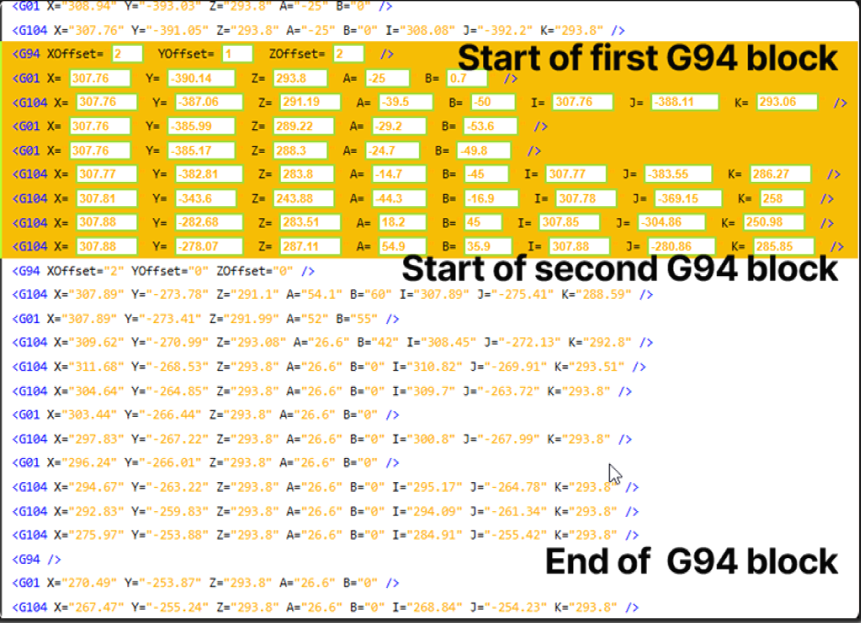
Only the points inside the G94 section receive the additional local offset.
Controller-Specific Feature (Sinumerik One)
Vehicle Frame
The Vehicle Frame (VEHICLE_REF) is considered a normal frame and can be used as a pivot point in Pivot Teach.
It is defined in the program and is relative to the previous G93 or G113/G114 frame.
Using this frame does not modify the actual point coordinates.
Characteristics
- defined directly in the NC program
- relative to the previous G93 or G113/G114 frame
- usable as a pivot reference
- does not modify the original point coordinates
Step 1 — Set the VEHICLE_REF Offset Values
This offset is applied additively on top of the previous G93 or G113/G114 frame.

Step 2 — Press Accept
This frame can now be used as a pivot point in the Pivot Teach workflow.
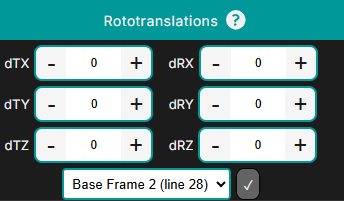
Controller Note
The Vehicle Frame (VEHICLE_REF) is available only for Sinumerik controllers.
Operator insights
- Understand the pivot: the active frame (G93/G96 or G94) defines the pivot used by the Pivot Teach Panel.
- G93/G96 are stable reference frames.
- G94 provides local incremental offsets and is ideal for fine local corrections.
- Frame commands are modal and remain active until another frame is defined.